[course]07 游戏模块01-1
安装准备
pip install pillow -i https://mirrors.aliyun.com/pypi/simple
pip install pyscreenshot -i https://mirrors.aliyun.com/pypi/simple
pip install requests -i https://mirrors.aliyun.com/pypi/simpleEX1 —— 基本操作入门
from game_graphics import *
from tkinter import *

def appStarted(app):
    """
    app启动时设置一个变量
    :param app:
    :return:
    """
    app.counter = 0

def keyPressed(app, event):
    """
    监控键盘操作,每次键盘操作会调用这个方法
    :param app:
    :param event:
    :return:
    """
    app.counter += 1

def redrawAll(app, canvas):
    """
    屏幕会不停的进行重绘
    :param app:
    :param canvas:
    :return:
    """
    canvas.create_text(app.width/2, app.height/2,
                       text=f'{app.counter} keypresses', font='Arial 30 bold')

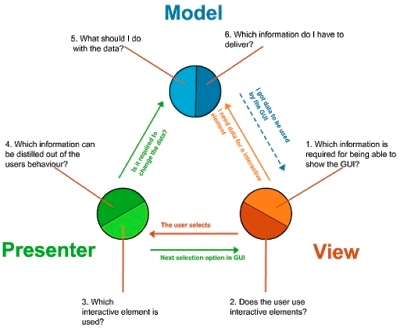
runApp(width=400, height=400)MVC
EX2
使用键盘操控移动
EX3 使用键盘的左右键来移动圆点
ex4 判断边界,让圆点不移出画面
EX5 让圆点从另一侧出现
EX6 在x轴和y轴方向移动
EX7 跟随鼠标点击移动
EX8 根据时间移动
MVC中不要在view中修改models
Last updated